
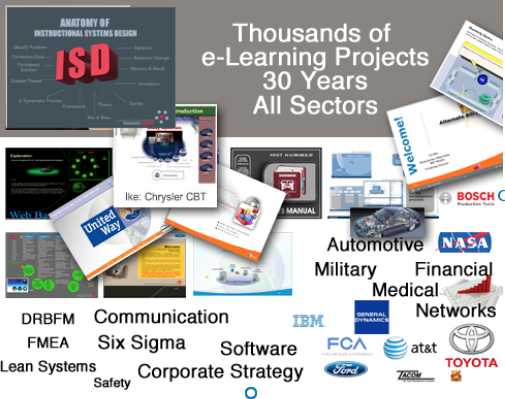
ELearning Instructional Design
“Identify corporate wide business problems and develop training strategies to align personal goals with the business vision. (The ID translate problems into training gaps)”
Competency Radar – AI-Assisted Proficency
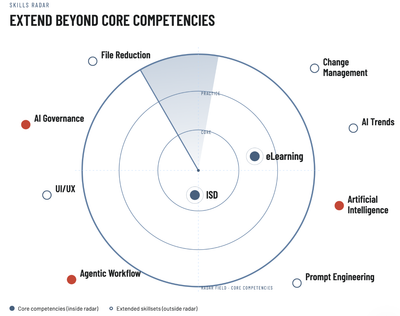
Extend Beyond Your Knowledge Radar – From “I know ISD” to “I solve high-value business problems because of hours of expanding knowledge beyond core competencies.” That positionsanyone to be a stronger asset for Elearning & Instructional Design ID training projects, as a project lead, developer or, management.
Beyond Instructional Design & eLearning
My value extends well beyond designing training. Over 30 years, I’ve learned that clients rarely need “another course”—they need someone who can identify business problems, reduce risk, improve performance, and protect project investments.
Project Profile Summary: 1 – Change Management & Scope Protection
Saved a Tier 1 automotive supplier from a potential $1.2 million contract reduction.
During a large enterprise learning project, I maintained meticulous documentation of every requested change throughout the project lifecycle. When the customer later questioned project costs and attempted to reduce the contract because of significant scope growth, the documented change history clearly demonstrated that the additional work resulted from customer-requested changes—not project overruns.
The result was that the prime vendor successfully defended the project scope and protected approximately $1.2 million in revenue.
Many competing Tier 1 vendors working on similar initiatives were unable to substantiate scope growth and experienced significant financial losses.
Value Delivered
- Protected project revenue through disciplined scope management.
- Created an auditable record of change requests.
- Reduced contractual and financial risk.
- Strengthened customer accountability through objective documentation.
Project Profile Summary 2 – Performance Engineering & Operational Efficiency
Eliminated field system crashes by redesigning the application architecture.
Working on a defense contract supporting military field operations training, I discovered that personnel were experiencing frequent application crashes on company-issued laptops. Rather than assuming the hardware was at fault, I analyzed the application’s structure and determined that the problem stemmed from a single, oversized file that exceeded practical operating limits in the field environment.
I redesigned the solution by breaking the application into smaller, optimized modules.
Result
- Eliminated recurring system crashes.
- Improved reliability for field personnel.
- Increased operational productivity.
- Reduced downtime and technical support requirements.
- Extended the usable life of existing hardware, avoiding unnecessary replacement costs.
Advantage – Extended Skillset & Experience Brings
The ability to…
- Diagnose root causes instead of treating symptoms.
- Protect projects from costly scope creep.
- Improve business processes—not just training.
- Optimize system and application performance.
- Identify operational risks before they become expensive problems.
- Translate technical complexity into practical business solutions.
- Balance instructional effectiveness with business objectives.
- Deliver measurable improvements in cost, quality, efficiency, and performance.
The difference that experience makes: I don’t simply build learning solutions—I solve business problems that happen to involve learning, technology, people, and performance.
Enter the Digital Age of ELearning

…d is for digitizedi
It’s All Digitized
From classrooms, desk chairs, floppy disks, CD Drives and books, to online learning — eLearning has transformed from physical to digital — it’s all digitized.
Site Goal
The goal of this site is to provide clarity as it relates to AI, e-Learning, & Instructional Design.
Pre-Development Tools
Project Management — eLearning Timeline
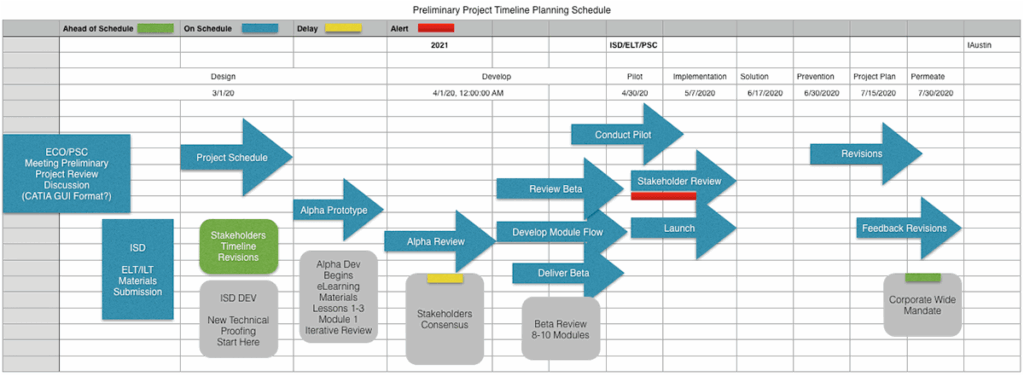
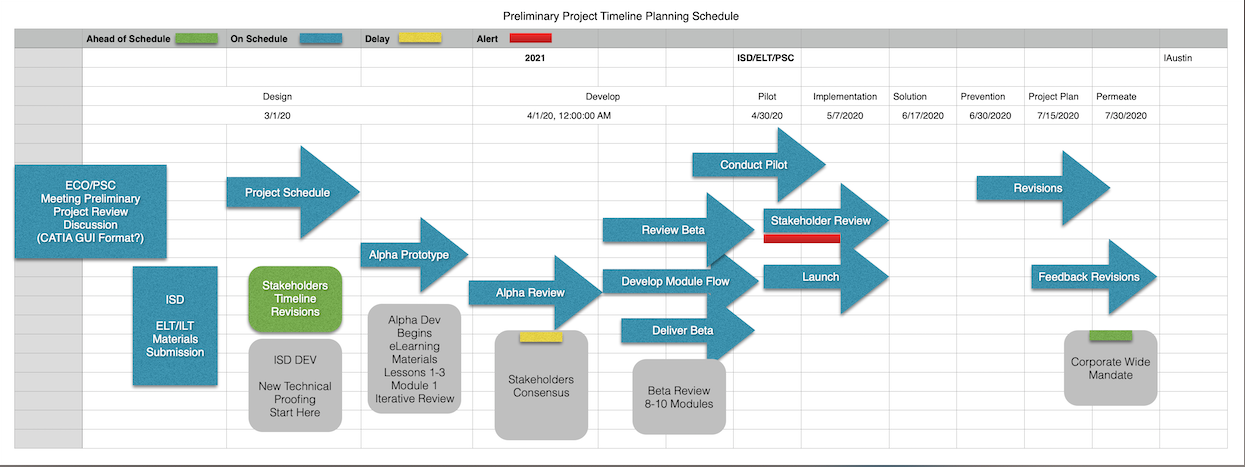
Before every project, there should be Systematic Project Management, which provides: high-level overview, resources (people, software, machines etc), stake holders, track barriers encountered, change management — to monitor scope-creep, & timeline of development from start to finish.
I personally incorporate change management into the project timeline.
(Secured 100K in project revenue by proving scope-creep was the result of new requests)
Storyboarding
Purpose:
Storyboards insure proper sequence of all content, quickly identify content drift & content duplication. It provides a visual project roadmap to strictly maintain content continuity during the ADDIE Development Phase.
Create robust storyboards that provide a roadmap of a project to visually guide the development phase. Storyboard basic elements consist of screen description, screen text, media mapping, narration of what will be said, graphics (what will be created; the more visuals supplied or sketched the better), use of supporting animation, interaction, navigation and branching.
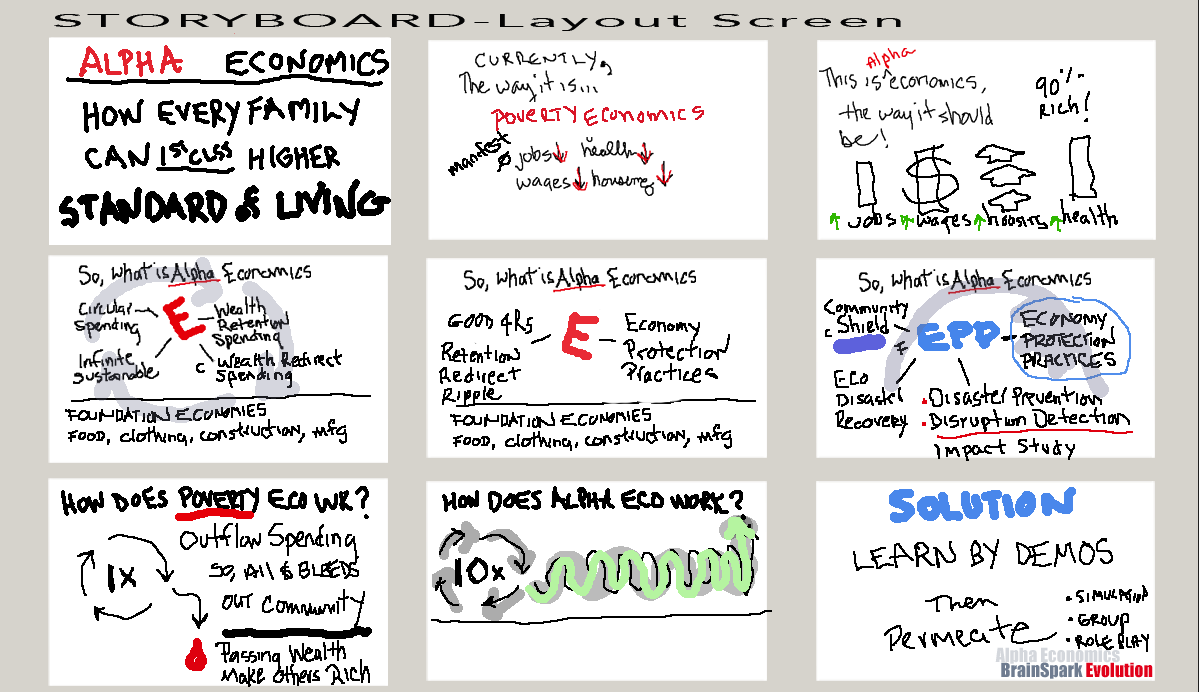
Quad 4 Example Storyboard
Define Problem
Any hindrance to achievement.
Define Solution
A systematic approach to all problems — Personal or Corporate.

- Encounter a problem
- Research the problem
- Generate a plan to solve the problem — permanently
Problem Entry Journal
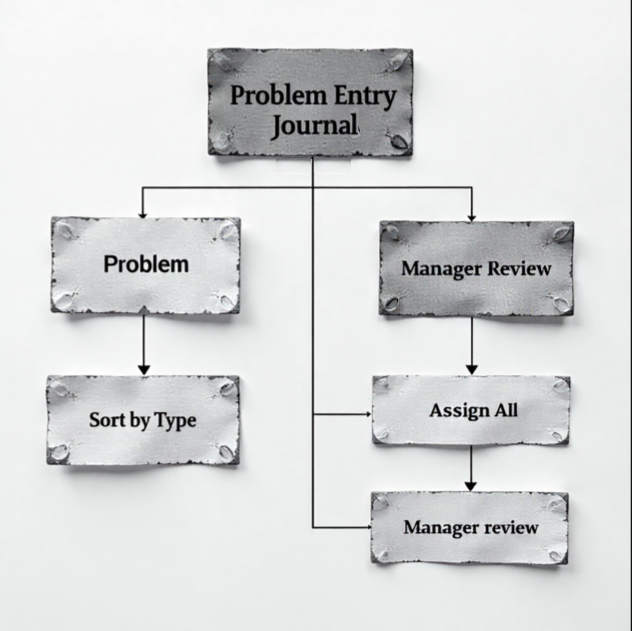
All levels of any problematic issue is captured in a corporate-wide journal, divided by types, assigned to respective Departments for review and potential training evaluation.
Problem Solution Report
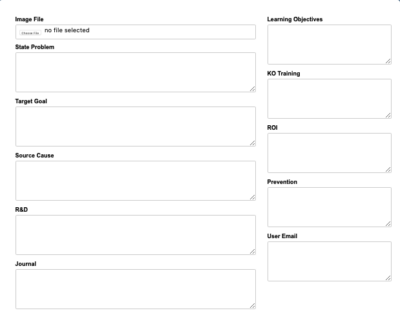
Example: Problem Solution Report
Explained fields 1–5: Identify (ID) all corporate wide business gaps/problems and develop training strategies to align employee goals with the business vision.
It involves several steps:
1. Understanding the Problem
Clearly define what the issue is. Identify the root causes, not just the symptoms. Gather relevant facts, data, or context.
2. The Target Goal — The Correct Function
Imagine the ideal state, the final goal, the end target, of things functioning the way they should. To successfully solve any problem, you must deal with the true source of the problem—including learning level tier types target goal.
3. Source of Origin (SOO)
Investigate to find the source of the problem, or root cause. This could involve considerable investigation — R&D.
4. R&D For Possible Solutions
Brainstorm multiple ways to address the problem. Consider short-term and long-term fixes. Evaluate potential risks and benefits.
5. Documentation of All Events
Keep historical records of all incidents of the problem: its first encounter, the number of occurrences, when first observed, how long ignored, is it a repetitive behavior, emotional impact, financial impact, and wasted time.
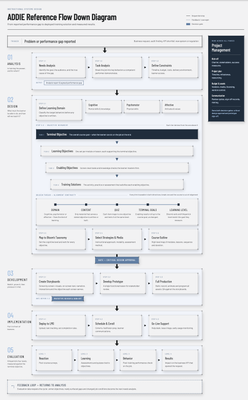
ISD Reference Flow Diagram
A graphical ISD Flowchart Diagram, that includes all sequential process steps from initial problem/gap reporting down to the final tier of training solutions of terminal objectives. It includes Analysis, Design, Development, Implementation, Evaluations, and where course objectives, storyboards & course outlines are properly introduced into the ADDIE developmental process.
Concepts — Whole-Part-Whole
Immediately the next step is to provide a Whole-Part-Whole visual (anatomy of, exploded view, infographic etc) of the successful ideal version of the solution, which could include the brief and clearly stated lesson objectives and the terminal course objective.



AI ELearning Development Process Reference Framework

The purpose of the informational graphic is to provide quick high-level overview of the entire elearning development process in a linear format from start to finish—total of five tiers 48 processes.
Anatomy of ELearning
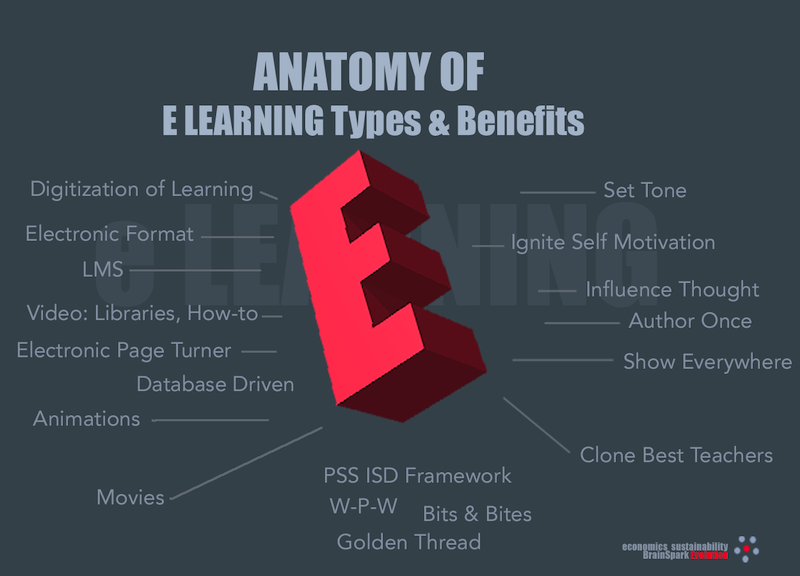
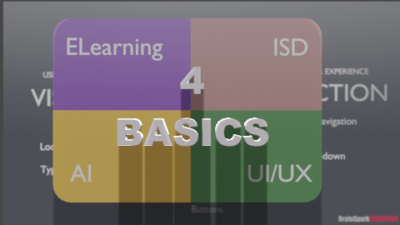
ELearning, ISD, and UI/UX work together to determine how effective digital learning performs. AI personalizes content and feedback, at a development pace unmatched compared to conventional development methods.
e …is for e-Learning
There is a systematic tried & true approach to creating effective e-Learning Instructional Design.
An aesthetically pleasing interface, and a strong attention-getting introduction screen, are just a few components that guarantee an effective online learning experience for the trainee.
What Is eLearning?
eLearning is the digitization of course material to electronic format.
Benefits of eLearning?
- Author once, train anywhere!
- Author once, train anytime!
- Author once, train anyone!
- Author once, train thousands!
- Author once, publish everywhere — you don’t need to schedule multiple classes or hire multiple instructors. After going live, the e-Learning can be accessed from anywhere in the world.
- Clone the best teacher and best practices — the best instructors and their teaching techniques can be cloned with e-Learning. Students and employees can be exposed to the most efficient methods of learning.
- Activity can engage the trainee — we learn by doing. e-Learning can be embedded with activities and practice screens that reinforce material and accelerate mastery of course goals.
- Rapid Development — eLearning tools provide opportunity for rapid development. Anyone can quickly develop engaging etraining courses in days vs. months.
The 4 main requirements of consideration today:
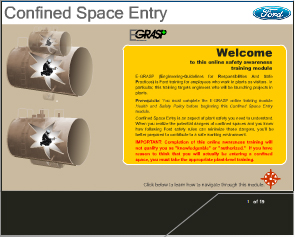
The biggest advantage in providing e-Learning is the ability to incorporate multi-media — animation, sound and movie videos. These elements are a must in every eTraining project.
Strong attention should be given to the course introduction: it should capture the trainee’s attention and include relevant animation (not just frivolous images flying around) and choice introduction music that will help relax, motivate and set the mood.
There are many tools that can build web-based training programs, but you want one that offers creativity and flexibility — to express learning content in an aesthetic, systematic manner, and to integrate your lessons into existing learning systems on both the front end and back end.
Which e-Learning Tool To Use?
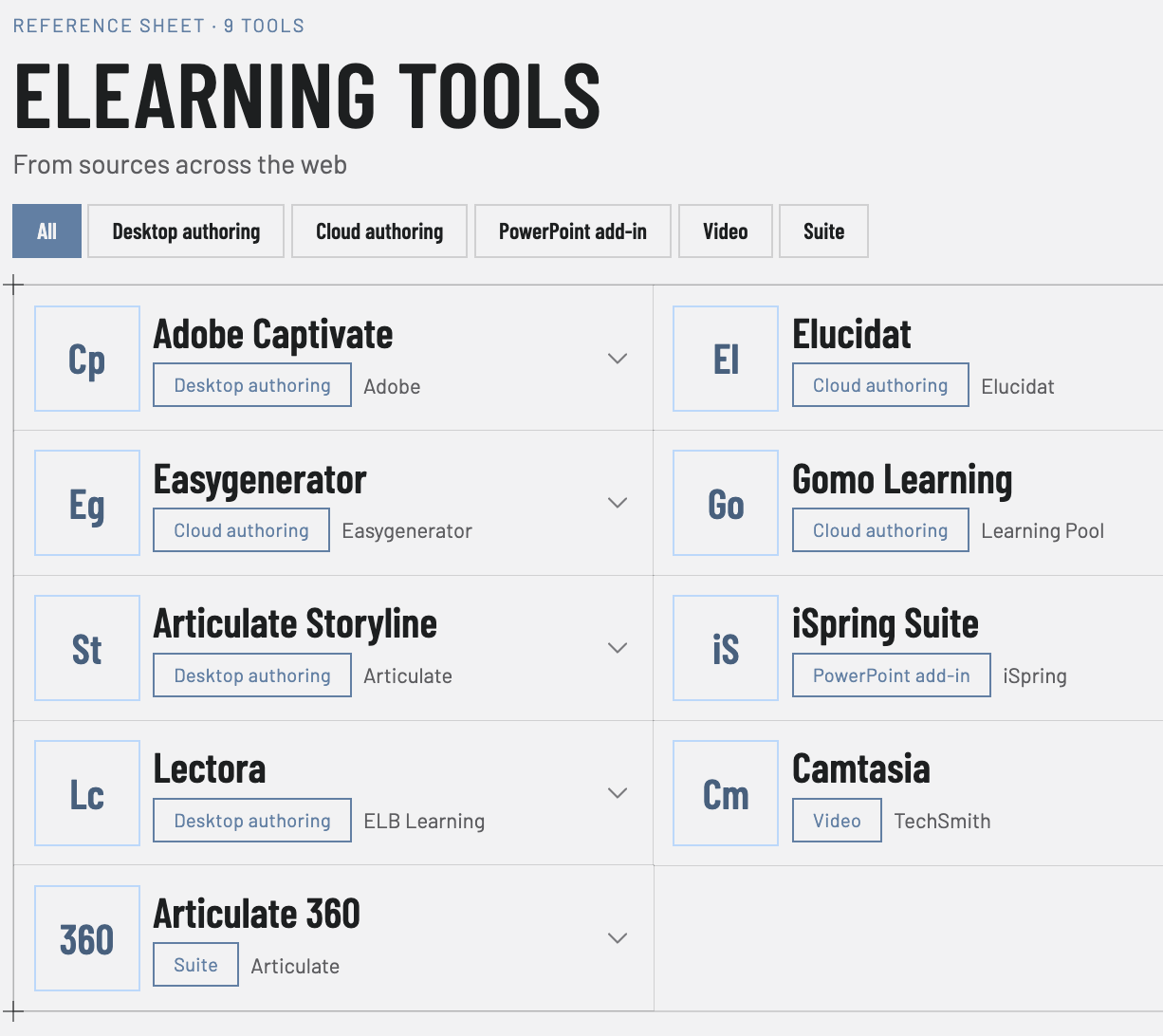
Three dominant tools are:
- Adobe Captivate
- Articulate 360
- Lectora
You can create impressive and very detailed learning screens, modules and scenarios without any programming knowledge. Individuals with JavaScript skills can create even more enhanced and effective learning content. With any of these tools you can build anything from simple cartoon animations up to database-integrated projects — and if the learning modules are created properly in the beginning, the modular efforts can be reused in future LMS systems.
ELearning Custom Graphics Needed
All eLearning apps — Captivate, Articulate, and 20+ others — have limited built-in capability for producing advanced ELearning.
AI ELearning Instructional Design — For Best ELearning Results
For real-world animations, complexity, scenarios, custom interactivity and functionality, you need specialized apps: Blender 3D, Illustrator, GIMP, along with others that have back-encoding features such as Adobe Animate and Godot. Without these features, ELearning is mostly cookie-cutter output — simplistic drag & drop, branching, re-purposed graphic templates & libraries.
See custom graphics in examples below.
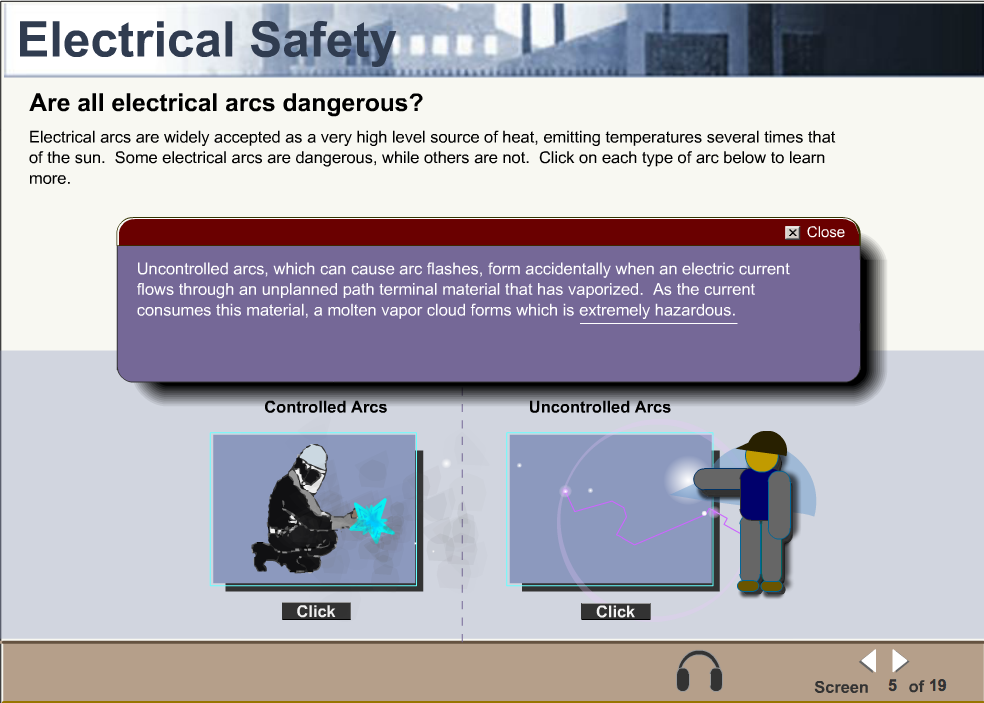
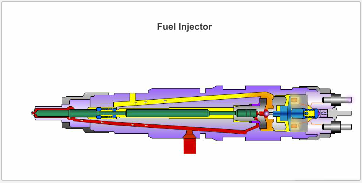
• Technical Animations — Fuel Injector (View Animation)
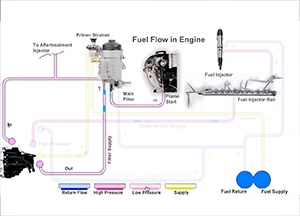
• Fuel Flow Process Flow Diagram (View Animation)
Practice to Mastery Exercises
UI/UX, interactivity, & multi-media are the critical components. An intuitive, clean, and accessible interface reduces cognitive load, allowing learners to focus on content rather than navigation. A positive user experience directly increases engagement, completion rates, and knowledge retention. Drag & drop functionality, audio, video, with immediate positive/negative feedback help to enable knowledge transfer.
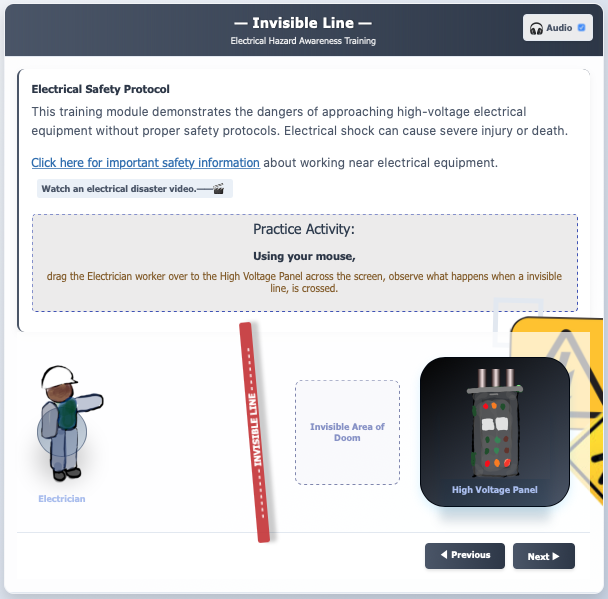
True effectiveness emerges when courses are student-centered. This means content is relevant, allows for personal pacing, and provides autonomy. Empowered learners are more motivated and invested in the outcome. Central to this model is interaction — passive reading leads to low retention. Instead, incorporating simulations, scenario-based decision points, and reflective exercises transforms learners from spectators into active participants, practicing skills in a safe environment and solidifying new mental models. The Electrical Awareness Practice Slide is a good example.
Reinforcement Feedback
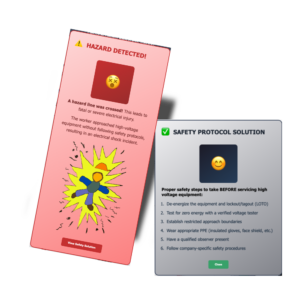
These interactions are supercharged through multiple modalities. Catering to diverse learning styles by strategically combining text, audio, and video ensures broader comprehension. A complex procedure might be explained in text, demonstrated in a video, and then practiced in an interactive simulation with audio narration. Incorporate error/solution response feedback types — this end-of-practice event strengthens neural pathways, making the application of new knowledge likely to influence behavior in real-world situations.
Effective practice exercises are what lead to mastery.
Quiz — Educational Feedback
From question phrasing to quiz response is another opportunity to educate, even on wrong answers — providing explanation & consequences of choice vs. a simple “wrong” or “right” response.
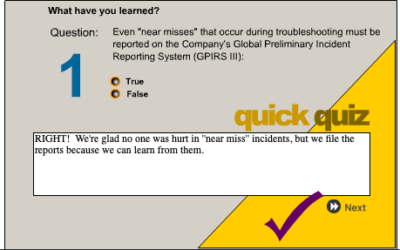
Quiz Feedback Rational
Effective quiz performance feedback utilize both positive & negative reinforcement to build confidence with constructive guidance to correct mistakes—a clear rationale of quiz improvement.
Positive Feedback
What it is: Praise that highlights what trainee did right.
The Rationale: It reinforces good habits, and motivates people to keep up strong performance.
Example: “You nailed the question on Lockout Safety because you clearly compared protocol step-by-step.”
Constructive (Negative/Corrective) Feedback
What it is: Guidance that targets an error or a missed concept without being harsh or personal.
The Rationale: It points out blind spots and gives an actionable path forward so the learner knows how to fix the gap.
Example: “You missed the question on conductor protocol steps because you assumed the voltage was dead because the lights were off. Next time, double-check safety steps before touching any conductor.”
Why the Rationale Matters
Reduces Defensiveness: Explaining the why behind a grade or critique stops it from feeling like a personal attack.
Aids Retention: Learners remember corrections better when they understand the underlying rule or logic.
Prompt Engineering – AI L&D ISD. (Micro-Learning)
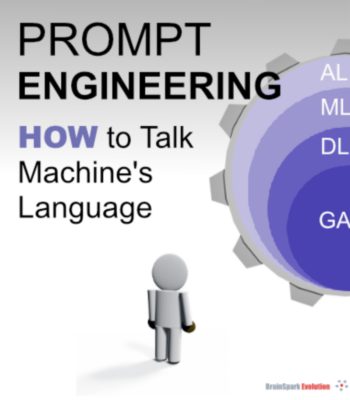
Prompt Engineering, How to Talk Machine’s Language
AI, ML, DL & GAI: The Layers Behind Chatbots
Think of these as nested layers. AI (Artificial Intelligence) is the big umbrella—machines mimicking human thinking. Inside it sits ML (Machine Learning), where computers learn patterns from data instead of following fixed rules. Inside ML sits DL (Deep Learning), which uses brain-like neural networks to handle complex tasks like language. GA (Generative AI) is a DL application that creates new content—text, images, ideas.
Understanding these layers matters for communication because it explains why wording matters: the AI is pattern-matching from learned data, not truly “understanding” like a human. Clear, specific prompts help it match the right patterns, giving you better, more accurate results.
Each layer sits inside the bigger one: AI is the whole idea of thinking machines, ML is the part that learns from data, DLis the neural-network approach inside ML, and GA is the piece that actually generates new text or images
Prompt Engineering: The Skill Turning AI Users Into AI Power Users
Why Prompt Engineering Matters More Than Ever – AI L&D ISD
As generative AI tools become embedded in daily workflows, the difference between a mediocre AI output and a brilliant one often comes down to a single factor: the prompt. Prompt engineering — the practice of crafting clear, structured instructions for AI models — has evolved from a niche technical skill into an essential literacy for professionals across every industry.
The Business Case for Better Prompts
Organizations investing in prompt engineering see faster turnaround on content creation, more accurate data analysis, and reduced time spent editing AI-generated drafts. Marketing teams use refined prompts to generate on-brand copy at scale. Developers use them to accelerate code reviews and documentation. Customer support teams use them to build smarter chatbots that resolve issues without human escalation.
The Future of Human-AI Collaboration
As AI models grow more capable, prompt engineering isn’t disappearing — it’s becoming more intuitive, blending into natural conversation. But for now, mastering prompt engineering skill remains one of the highest-leverage investments p
AI ELearning Instructional Design — Complex ELearning Types
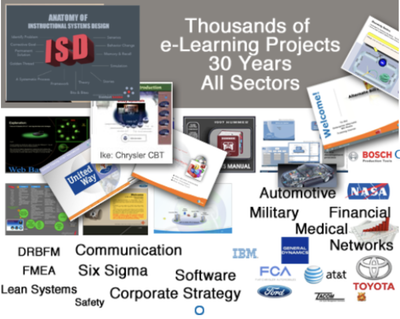
Complex training can incorporate goal-based narrations.
“Narratives possess power to re-direct the human soul, the ability to change direction of human thought, permanently.” — ThirdSons
- Activities
- Practice exercises
- Scenarios
- Stories — complex goal-based narrations
- Custom graphics
- Supporting software
- ISD models
- Memory techniques
- Case studies
- Complex back-end systems like SCORM
- Database driven
- Simulations
- Project management — prevent scope creep
- Course outlines
- Storyboards
- ISD maps
- Media maps
- Design documents
- The psychology of learning
- Complex learning methodologies
- Memory & recall methods
- 3D modeling animations/simulations
- Whiteboard explainer videos
Simple eLearning elements:
- Electronic page turner
- How-to learning aide (PowerPoint, PDF)
Blended Learning — Instructor Led + ELearning

Blended Learning Methodology: as an experienced eLearning developer, one can employ a wide scope of teaching methodologies that effectively facilitate knowledge transfer. Blended learning (instructor-led combined with eLearning/WBT) concepts and practices promote more of an andragogical, active learner-centered design vs. traditional pedagogical, didactic, passive teacher-centered formats. Blended learning offers the best outcome of adult learning — properly developed, it produces stimulation, motivation (based on natural curiosity), and a more productive training process for the adult learner.
Anatomy of Instructional Design

i …is for instructional.
When to use ISD, or when not to.
What Is Instructional Design?
“It is the process of gathering and distilling information into bite-size increments enabling learners to digest & learn.”
Instructional Design for ELearning Overview
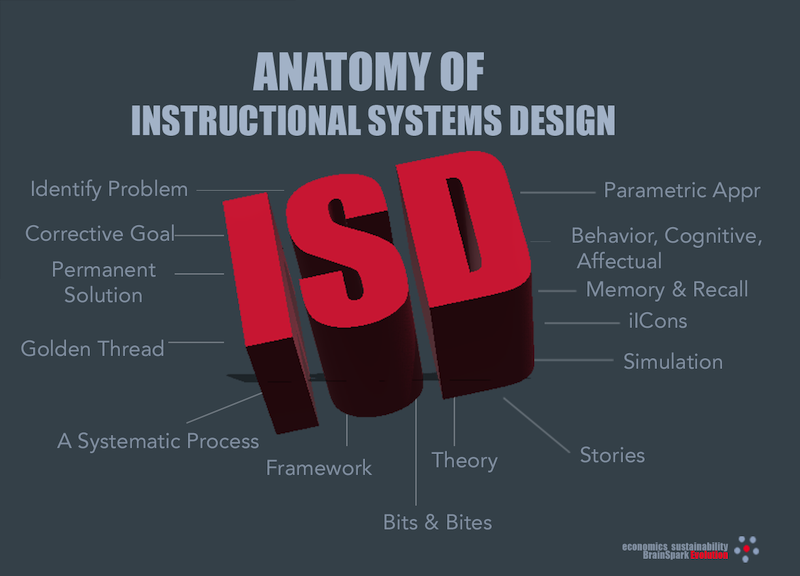
Instructional Design is a systematic approach to deliver learning.
…I is for Instructional
…S is for Systematic
Design is setting order to any given process
…D is for Design
A systematic training process is an absolute necessity when developing large-scale corporate or industry-wide projects.
Instructional Design Models
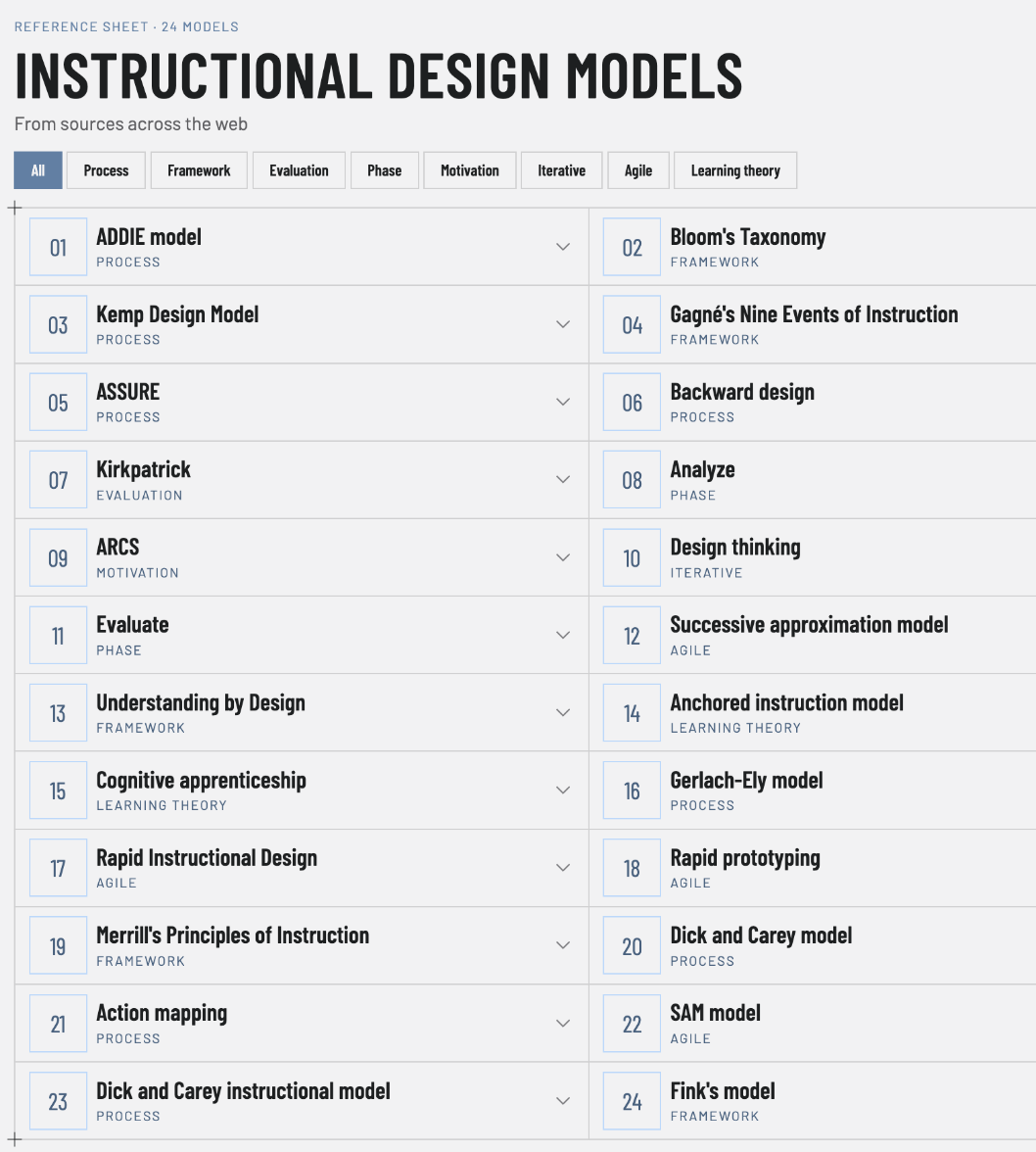
There are numerous instructional design models used to design a course, with ADDIE — the original, from 1975 — the most prominent, while many others are revisions of ADDIE.
A brief list of ISD models and their major differences: ADDIE (the most widely used, five phases — Analysis, Design, Development, Implementation, Evaluation); Dick and Carey Model (nine iterative steps aligning objectives, assessments and instruction); Kemp Design Model (flexible, circular, nine non-linear elements); SAM (agile, iterative, rapid prototyping); ASSURE (six steps for integrating technology); Merrill’s First Principles of Instruction (task-centered, problem-solving); Gagné’s Nine Events of Instruction (behaviorist, cognitive-psychology based); Action Mapping (business-focused, measurable actions); 4C/ID Model (complex learning, high-level skills); ARCS Model (motivation-focused: Attention, Relevance, Confidence, Satisfaction); Backward Design (starts with desired outcomes); Rapid Prototyping (quick develop/test cycles); Algo-Heuristic Theory (algorithmic steps, STEM/technical); Cognitive Apprenticeship (modeling, coaching, scaffolding); Constructivist Learning Environments (learner-driven, authentic problem solving); Elaboration Theory (simple-to-complex sequencing); Gerlach & Ely Model (pragmatic K-12 lesson planning); Hannafin-Peck Model (needs assessment, design, evaluation); Knirk and Gustafson Model (concise three-stage model); Transactional Distance Theory (dialogue, structure and autonomy for distance learning).
Key Takeaways
- Traditional models (ADDIE, Dick & Carey) are structured and systematic.
- Agile models (SAM, Rapid Prototyping) focus on iterations and speed.
- Motivation-based models (ARCS) prioritize engagement.
- Constructivist models (CLEs, Cognitive Apprenticeship) emphasize active learning.
The ADDIE Model

Utilizing the ADDIE process and other ISD models — SAM, Agile etc. — ensures that the majority of the content flow, lesson modules, practice exercises, activities (single or group), knowledge checks and assessments maintain a common unifying thread throughout the entire process.


Objectives
Terminal Lesson Objectives Extraction
The terminal goal is the unifying thread of the entire course. This terminal goal must clearly state how the training will impact the company and individual. It must integrate the corporate mission statement as part of the overall theme of the course from the introduction and again during the final summary of the eTraining project. Terminal objective
Perform the task to standard on the job
The terminal objective states what the learner does back on the job, under real conditions, to the standard the business needs.
Problem Solution Objectives
Identified in the initial Design Phase: Through Domain—Objectives—Content—Assessment—Delivery Medium. The golden thread of objective continuity is maintained: alignment, verb, condition, criteria, including best optimized content delivery formats & assessment types.
From Gaps to Objectives
ID Source of Origin (SOO) / Root Cause.
ID Terminal Objective — set target end-goal.
ID Enabling Objective — gaps, missing micro KO.
ID which of the 3 Behavioral Domains, then, based on selection, develop incremental objectives/stepping stones to KO.
Problem = Gap = Objective = Stone.
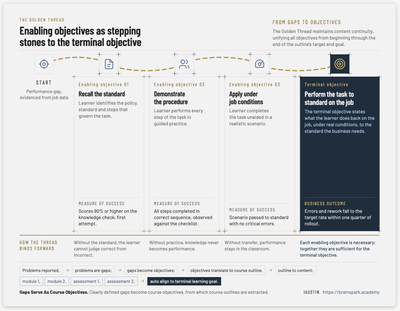
Gaps Serve As Course Objectives
Clearly defined gaps become course objectives, from which course outlines are extracted.
Golden Unifying Thread
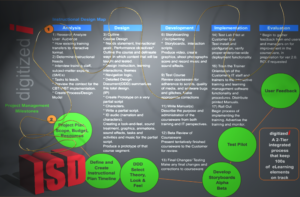
The Golden Thread maintains content continuity, unifying all objectives from beginning through the end of the outline’s target end goal.
The training will include all the individual performance goals that lead up to the terminal goal and mastery of e-Learning Instructional Design. The online learning project must be constructed to offer the user a low learning curve and high retention potential.
Inaccurate Define Vague Objectives
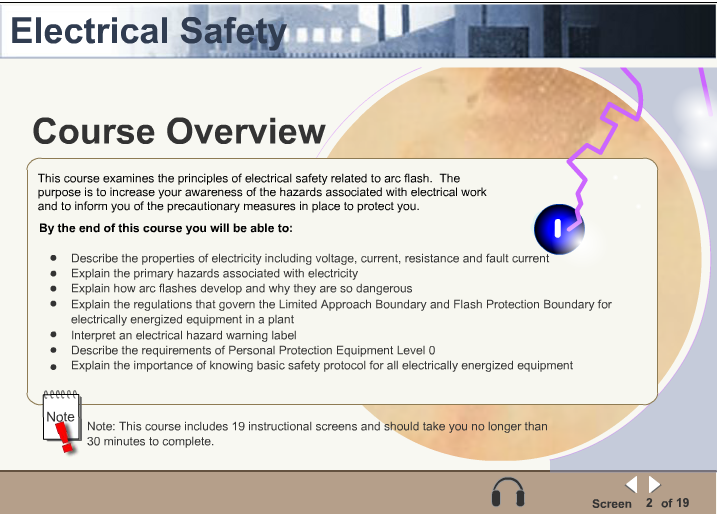
Leading with vague Bloom verbs, accurate measurable learning progress can not be confirmed. Vague verbs are best suited for over all goal/terminal course objectives. The several Course Overview objectives can mis-guide the content, and thus fail the learner in reaching the correct course objective. All objectives of this basic Awareness course are abstracted from the first two levels — Remembering and Explaining when the goal is mastery at an advanced creative level.
Objectives should be created based on the proper Domain, and also remain confined to the proper learning level determined during analysis phase (Bloom’s Taxonomy of Three Domains of Learning).
Novice ID’s might cover the right content, but many of their objectives use vague, unmeasurable verbs (“understand,” “examine”). Some bundles two objectives into one. Most lack a condition (how learners show the skill) and a criterion (what counts as success). Many of their objectives sits mostly at the lower levels of Bloom’s and never reaches Evaluate or Create, which can be catastrophic on ROI or if critical on-the-job safety results are required.
Mis-alignment
Misaligned: an “observation” does not measure cognitive learning, it (suits psychomotor / affective) domains.
Each link must match: the domain sets the verb, the verb acts on the content, and the quiz asks learners to perform that same verb on that same content.
Seven objectives. None of them measurable—a teardown

ISD Learning Objectives Anatomy – Teardown
Typical Teardown—Electrical Safety Overview
A course overview from an electrical safety module, taken apart and rebuilt. Start with the original objectives, then step through the anatomy of each objective type and the terms used to describe them. Objectives Teardown
Properly Aligned Structured Objectives
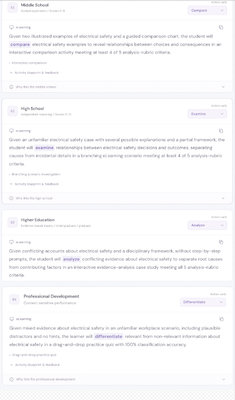
All objectives of this basic Awareness course are abstracted. Here are more accurate examples of Elearning training objectives and levels.
Given a list of 10 workplace hazards, the learner will identify the hazards that require PPE with 100% accuracy.
Given photos of three job sites, the learner will analyze the electrical hazards in each work environment select all potential hazards listed on the site safety standard.
Given a mixture of safety protocols and competing constraints for an unfamiliar workplace incident, without hints, the learner will differentiate relevant from non-relevant safety protocol steps in a drag-and-drop practice quiz with 100% accuracy within 60 seconds.
Some variants that achieve the same objective alignment(s) are: KSA, JGB, SMART, ABCD.
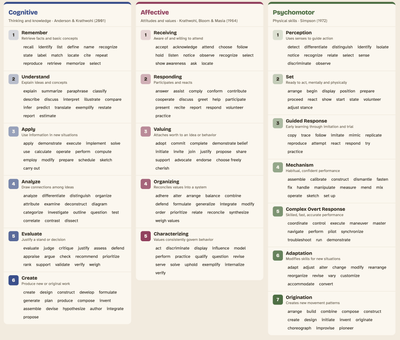
Bloom’s Taxonomy Verb Table
Bloom’s Taxonomy classifies learning objectives into three domains: Cognitive (mental skills), Affective (growth in feelings or emotional areas), and Psychomotor (manual or physical skills). Below are the key levels and associated verbs for each domain.
It is important to understand all the underlying technical details and learning theories in order to create the most effective training. You need someone who comprehends the complexities of production yet uses practical experience to produce effective training.

Training Portal Interface UI/UX

The interface is the gateway into “the spark that ignites learning.”
Interface Design Examples — UI/UX
Interface design helps set the initial starting tone for the eLearning experience. Whether you are creating an e-Learning course for a small business, homeschool, or a large corporation, the interface sets the mood.
Game-Based Immersive Training — Interface
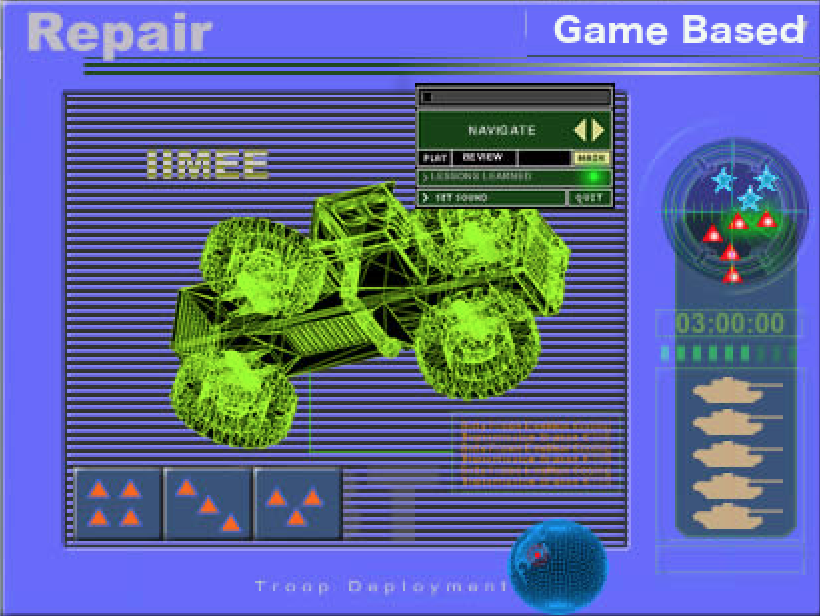
Game-Based e-Learning and ISD Development collaborate to design e-Learning programs aligned with corporate strategic targets and student learning objectives.
Developed ROI evaluation methodology to judge learning progress. Conduct user pilot testing to ensure course objectives are met — improving production development via CCS and design templates, and improving teamwork & workflow among departments by introducing a systematic approach to applying the ADDIE ISD process.
Interface Design — The 7 Mudas
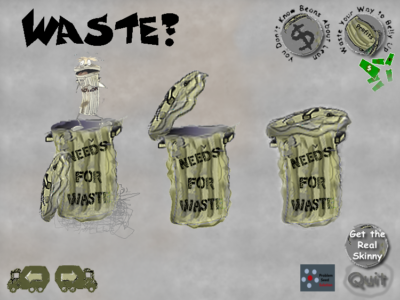
Interface design helps set the initial starting tone for the eLearning experience. There’s an advantage to building custom eLearning interfaces that reflect course content. Despite all the out-of-the-box software, specialized skill sets are required to create the best interface designs. This particular interface — on the hidden cost of waste, The 7 Mudas — requires a gritty, grungy look & feel.
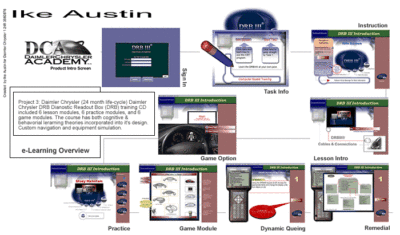
DRB Technical Equipment Training — Interface
Curriculum Development & Application
Comprehensive Curriculum Mapping aligns learning paths with the target audience. By following traditional curriculum design to the letter, the result is a successful eTraining outcome — from Beginner to Training Mastery Curriculums.
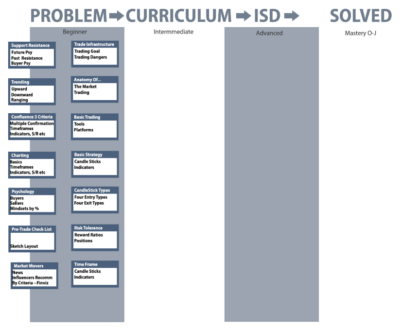
Problem Solution Goal: “this will get you there.” National Curriculum Development.
Risk Evolution — mitigate all learning-related disruptions.

Knowledge Objects — Interface

Information Security Training — Interface

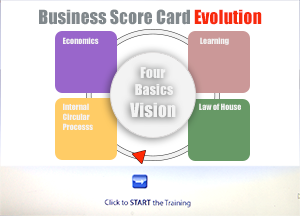
Business Score Card — Interface
DRBFM Failure Training — Interface UI/UX

• MizenBoushi Change Point Management (MBCPM)
• Design Review Based on Test Results (DRBTR)
Intellectual Property

Whiteboard Explainer Videos
Whiteboard animation explainer videos boost training effectiveness by combining visuals, storytelling, and motion to enhance memory retention. The step-by-step drawing process keeps learners engaged, while simplified visuals and narration improve comprehension. Studies show that dual-coding (audio + visual) strengthens recall, making complex concepts easier to remember. The engaging format reduces cognitive load, allowing for better information absorption. Ideal for corporate training, education, and onboarding, these videos create a lasting impact, ensuring key messages stick long after the session ends.
SMART Goals

Soft Skills
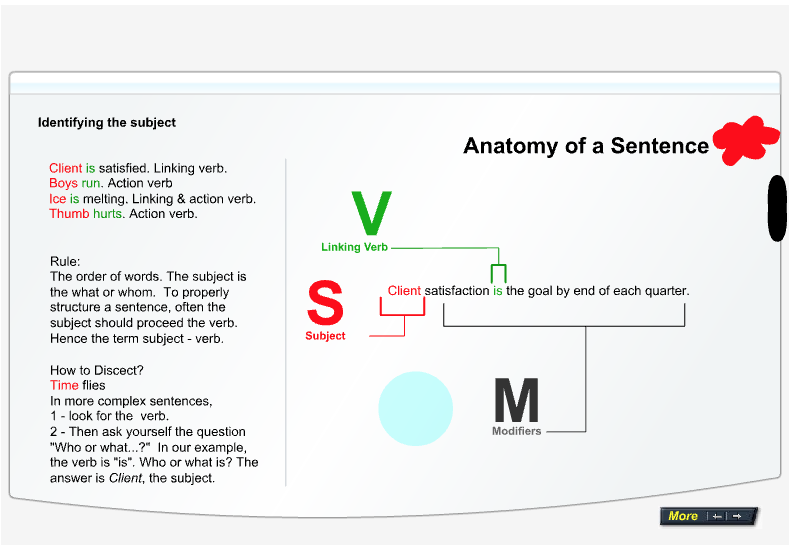
Sentence structure (a measurable hard skill) is important because it shows how words fit together to create clear meaning.
This is best graphically illustrated using an “Anatomy of a Sentence” graphic, because visuals make it easier to see how subjects, verbs, and modifiers connect and form a complete thought.
Solicitations — role playing with immediate feedback popup screens helps trainees become skillful in the art of persuasion.

Team Discussion Forum

Corporate, International & Global Team Development

- Team Synergy Development Schemes
- Team Building for Precision Performance
- Internal Business Initiatives & Philosophies
Vehicle Cybersecurity — DRBFM Paradigm

Efficiency Production Concepts
• A3 Report Writing

• Coaching Root Cause Analysis
• Compliance Training
- Toyota Five Business Concepts
- Challenge, Kaizen, Genchi Genbutsu, Respect, & Teamwork
- PDCA — Plan Do Check Act
- TBP — Toyota Business Practices
- OJD — On the Job Development
- Randomized Controlled Training
- Parametric Thinking Team Solutions
Data Visualization
Visualize quantities and hierarchies using graphically displayed data — discover valuable insights vs. viewing monotonous tabular spreadsheet data. View Animated Bubble Chart
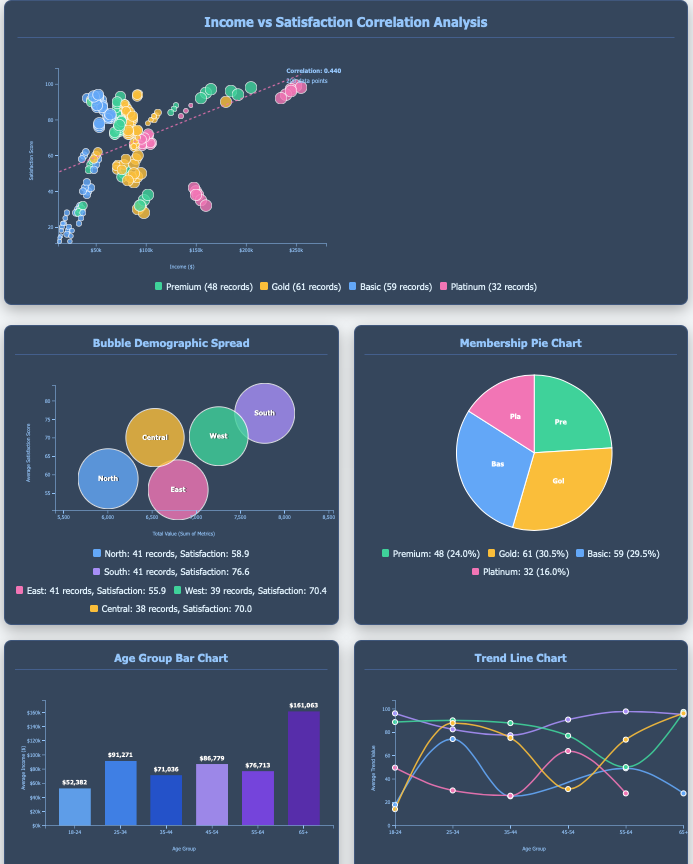
Economics of ELearning — a visualization by market, trends, & revenue spent.
Economics — Content Screens
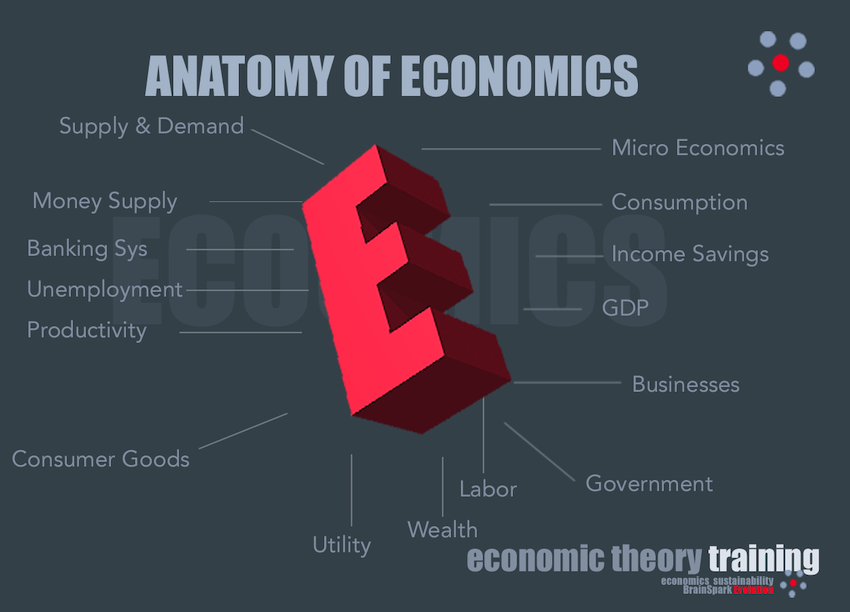
- Inverse Economic Dynamics
- Economic Value Systems
- Cash Bio A-ology
- Currency vs Lifestyle
- Economically Sustainable
Quantitative and qualitative data gathering and analysis: ROI, KPI, Success Case Methods, Descriptive Statistics.
Economic Dashboard Analytics (zoom)
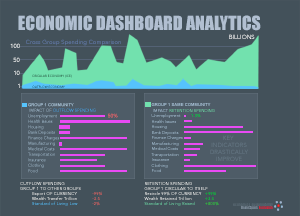
- Outflow Currency Spending Impact
- Local Linear Outflow Spending
- Local Circular Retention Spending Results
- Linear vs Circular Simulations


Research Drives the Decision
- Big Data Economics
- Data Analysis
- Surveys & Questionnaires
- Research & Data Collection
Economic Systems Flow Diagrams (Animation)

- Economic Currency Flow
- Key Economic Components
- Traditional, command, mixed, market
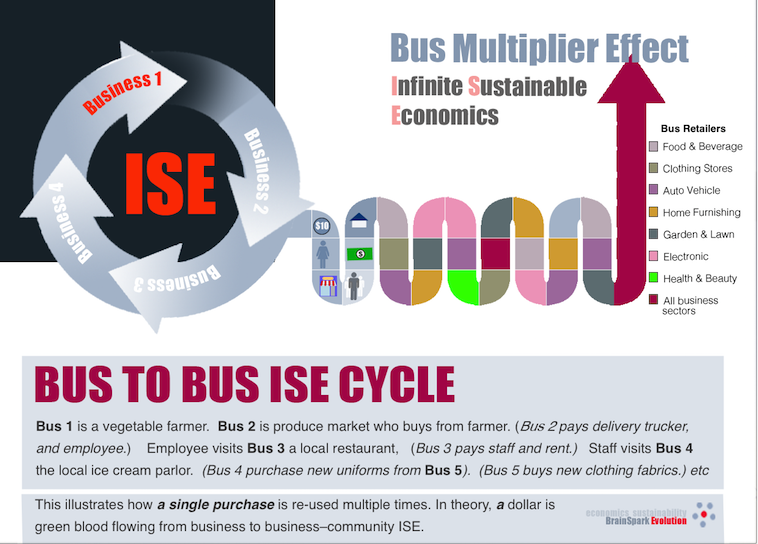
Circular Economics Evolution

Multiplier Effect WRS — BrainSpark Evolution (zoom)

Infinite Sustainable Economics — ISE (zoom)

- Wealth Retention Spending (WRS)
- 1X Local Outflow Spending (LOS) vs.
- 10X Local Retention Spending (LRS)
- GOOD4Rs — Retention, Redirect, ReCircle, Ripple Effect
- Infinite Sustainable Economy
- Collective Capital Raising (CCR)
- Collective Spending Initiatives (CSI)
- Local, Regional, National, Global
Economy Protection Practices

- Econ Disaster Prevention (EDP) (internal/external)
- Micro/Macro Functions
- Economic Permanent Sustainability
- Community Vulnerability Shield
- Protectionism vs. Open — Pros/Cons
- Traditional, Command, Mixed, Market
- Disruptions & Impact Mapping
- Import — As a Negative Wealth Redirect (pro/con)
- Government Subsidized Business & Economy
- Export Predatory Practices
- Eco Disaster Recovery
- Mission-Critical Continuation of Vital Infrastructure
Infographics — Reality of Airborne Particles
Visually enhance knowledge transfer using charts & graphics vs. a thousand words. The example below graphically illustrates the true hazards of virus transfer, which is well beyond six feet.

Bioaerosols — simple interaction, exponential double danger.
The reality of airborne particles is that there are no restrictions or confined distance of travel. One person, with one sneeze, can infect 100 people in a 60–120 foot area with a slight shift of a breeze.
Bioaerosols — Disbursement Proximity Facts
Talking: 1–50 particles per second
Shouting: 6 times the particle distribution
Coughing: 50 mph, 3,000 droplets
Sneezing: 100 mph, 10,000 droplets
Airborne life span: 3–6 hours
Aerodynamic travel: up to 160 feet, exhaled droplets
HVAC can spread virus or smoke 10 floors up.
Airborne particles can remain suspended long after an infected person has left the area.
Source: Johns Hopkins Airborne Experiment, 1956.
Anatomy of UI / UX
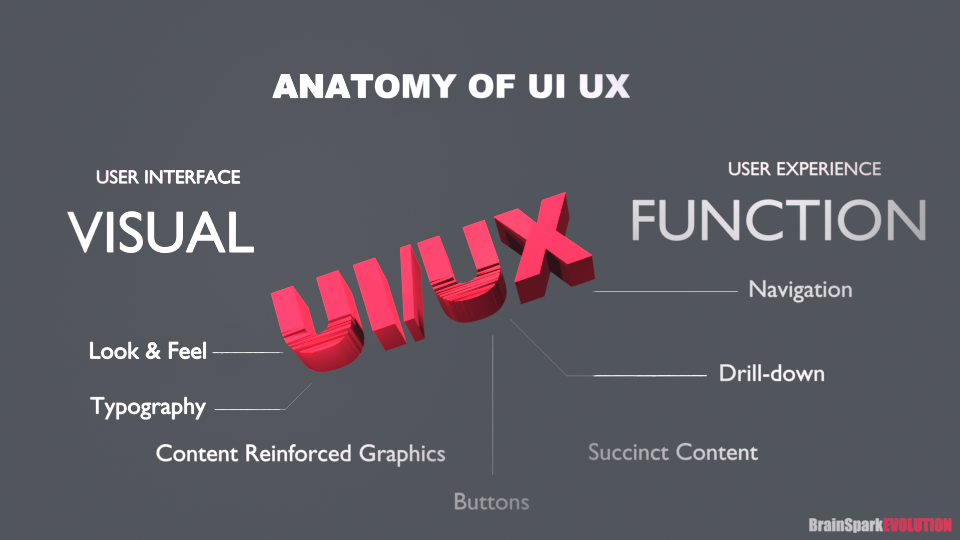
Key Differences: UI vs. UX
- UI (User Interface): focuses on visuals, branding, color schemes, typography, buttons, and overall aesthetics.
- UX (User Experience): ensures usability, smooth navigation, accessibility, and user satisfaction.
Understanding UI/UX: Simplified Definition & Best Practices
UI and UX are essential in web design, ensuring a site is both visually appealing and functionally efficient. While the terminology has evolved, the core concepts remain unchanged.
- Traditionally, “Look & Feel” has transformed into User Interface (UI) — the visual layout, colors, typography, and design elements that set the tone for interaction.
- Meanwhile, “Website Function” is now referred to as User Experience (UX) — how users navigate, interact, and accomplish tasks efficiently.
A well-designed UI enhances aesthetics and reinforces content through graphics, while UX ensures functionality minimizes unnecessary steps, keeping interactions smooth. Menus, navigation structures, and layout planning play a crucial role in reducing friction and improving usability.
10 Basics of Other UI/UX Features
- Simplicity: keep design minimal and intuitive.
- Consistency: use uniform colors, fonts, and layouts.
- Mobile Responsiveness: ensure usability across all devices.
- Fast Load Speed: optimize images and code to prevent delays.
- Clear Navigation: use logical menus with minimal drill-down.
- Readability: prioritize legible fonts and sufficient contrast.
- Effective Call-to-Action (CTA): guide users toward key actions.
- User Feedback: provide confirmation messages and error alerts.
- Accessibility: design for all users, including those with disabilities.
- User Testing: continuously refine based on real user behavior.
Mastering UI and UX ensures a website is both attractive and highly functional, leading to better engagement and satisfaction. UI/UX Page Template
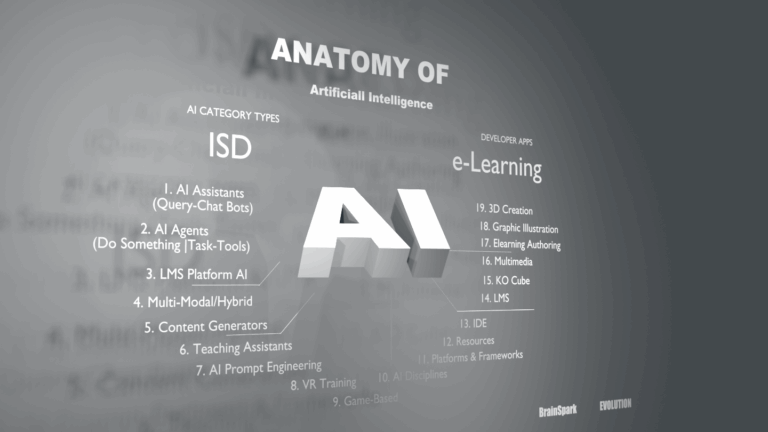
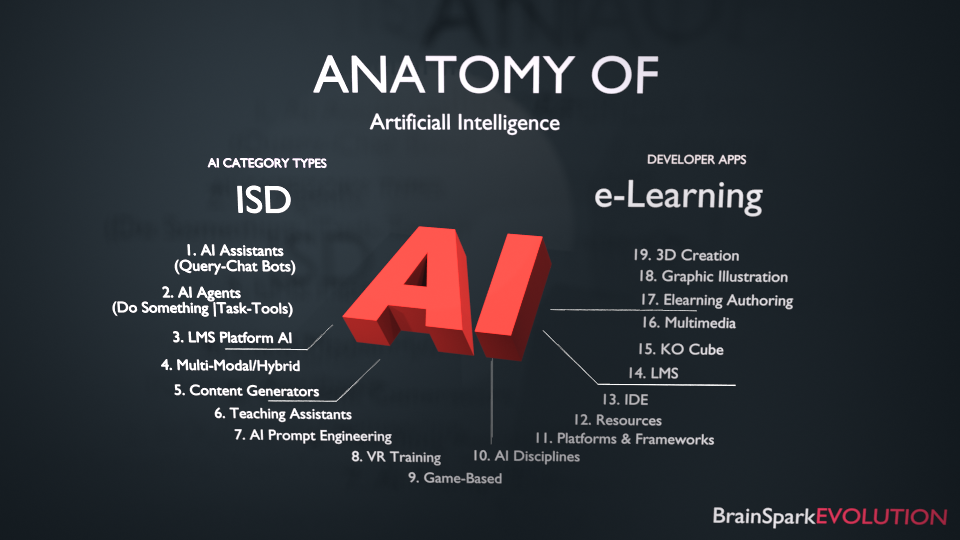
Anatomy of AI
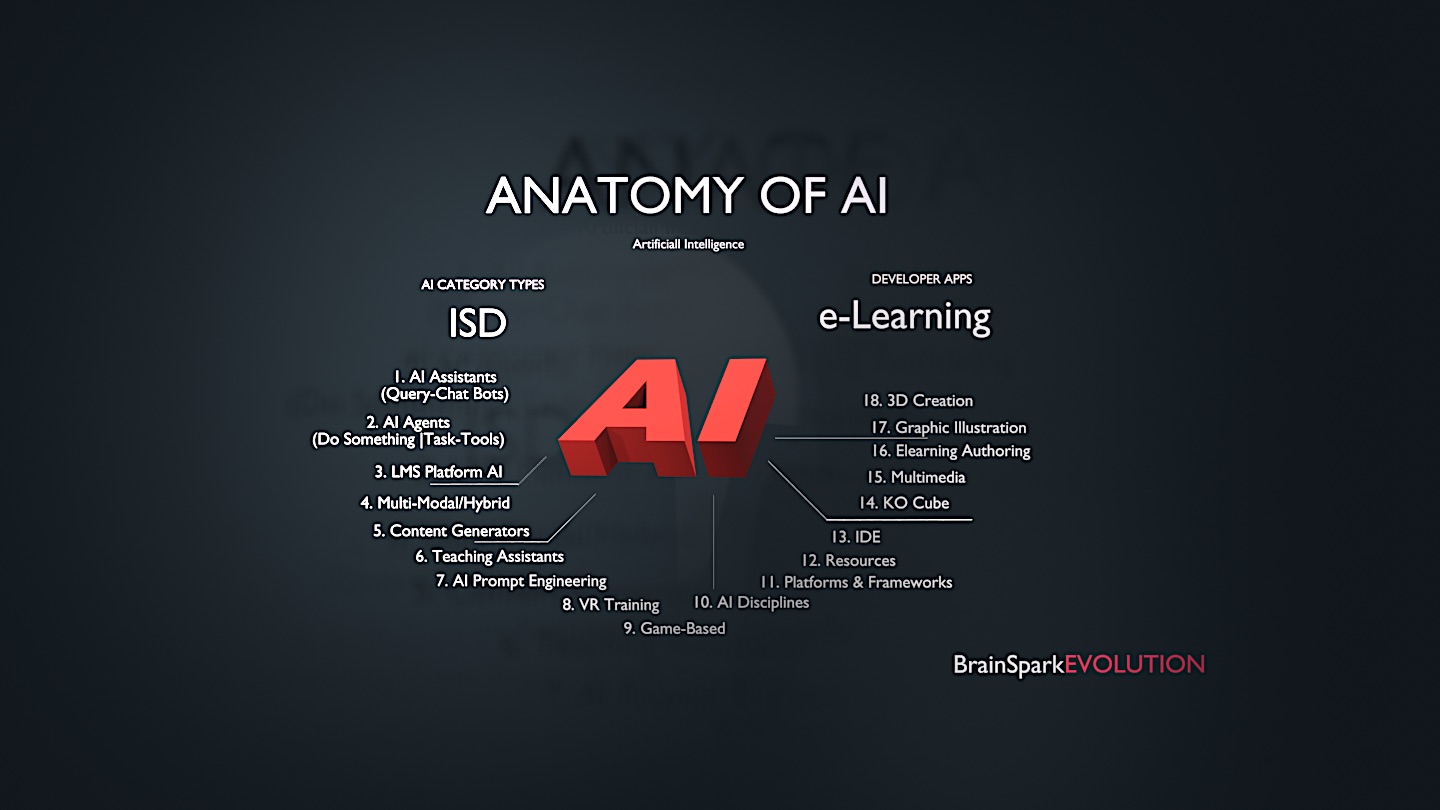
Artificial Intelligence, as it relates to ELearning & Instructional Systems Design (ISD).
A Brief AI Summary — AI (ISD) & eLearning
A One Man Team of 20!
Artificial Intelligence (AI) is transforming instructional design (ISD) and eLearning by enhancing personalization, efficiency, and engagement. AI-powered tools analyze learner data to create adaptive learning experiences, tailoring content to individual needs. For example, AI-driven platforms like ChatGPT, Scribe, and adaptive learning systems adjust difficulty levels in real time based on learner performance, improving knowledge retention.
In content development, AI accelerates course creation by generating quizzes, summaries, and even full lessons from text inputs. Tools like Articulate 360, Synthesia, and Canva Magic Write leverage AI to automate tasks such as scripting, video generation, and graphic design, reducing production time. Additionally, natural language processing (NLP) enables AI chatbots and virtual tutors to provide instant learner support.
AI also enhances assessment and feedback. Machine learning algorithms analyze responses to detect knowledge gaps and recommend targeted remediation. Automated grading systems, powered by AI, provide instant feedback on assignments, freeing instructors to focus on higher-level teaching strategies.
Another key application is predictive analytics, where AI identifies at-risk learners by tracking engagement patterns, allowing for timely interventions. Furthermore, AI-powered simulations and gamification make learning more immersive through virtual reality (VR) and augmented reality (AR) integrations.
The Power of AI = (10X)
One multi-skilled ID developer can complete in one hour what previously took a ten-person team of specialized professionals 40 hours — a 90% reduction, both in manpower production and development time. Consequently, a theoretical $100K budget is reductively decreased to $10K.
A Use Summary — Partial ISD & ELearning List for a Preliminary Conceptual View
Included is a comprehensive list of AI apps/tools organized by instructional design (ID) tasks, helping you streamline ADDIE course development from objectives to evaluation.
- AI Assistant — AI-powered virtual assistants that answer questions and automate workflows using NLP. Examples: Siri, Google Assistant, Amazon Alexa. ISD Uses: automated learner support (chatbot FAQs), personalized reminders, voice-activated quizzes.
- AI Agents — autonomous or semi-autonomous AI systems that perform tasks, make decisions, and interact with environments. Examples: Zendesk Answer Bot, MetaTrader AI, Samsung SmartThings. Instructional Uses: adaptive tutoring, scenario-based training, automated feedback.
- LMS Platform — software for delivering, tracking, and managing courses, often AI-integrated. Examples: Moodle, Blackboard Learn, Canvas. Instructional Uses: learner analytics, auto-generated learning paths, gamification.
- Multi-Modal Hybrid AI — systems combining text, speech, and image inputs/outputs. Examples: GPT-4, Google Gemini, CLIP. Instructional Uses: interactive text+video lessons, language learning, accessibility conversions.
- Content Generators — AI tools that create text, images and video from inputs. Examples: ChatGPT, DALL·E, Jasper. Instructional Uses: rapid course material, localized content, custom scenarios.
- Teaching Assistance AI — tools supporting educators with grading, planning and engagement. Examples: Gradescope, MATHia, Knewton. Instructional Uses: automated grading, lesson plan suggestions, sentiment analysis.
- AI Prompt Engineering — the skill of crafting effective inputs to optimize AI outputs. Instructional Uses: customized learning prompts, scenario generation, assessment design.
- VR Training — AI-enhanced virtual reality simulations. Examples: Strivr, Osso VR, Talespin. Instructional Uses: safety simulations, medical procedures, soft skills practice.
- Game-Based AI Learning — AI-driven educational games that adapt to skill level. Examples: Duolingo, Prodigy Math, Minecraft Education. ISD Uses: adaptive challenges, microlearning quests, collaborative learning.
- AI Disciplines — subfields of AI research and application: Machine Learning, Computer Vision, NLP. Instructional Uses: predictive analytics, natural language feedback, computer vision proctoring.
- Platforms & Frameworks — tools/libraries for developing AI models: TensorFlow, PyTorch, Scikit-learn. Instructional Uses: custom AI tutors, automated course tagging, sentiment analysis.
- Resources AI — datasets, APIs and tools for AI development: Kaggle, OpenAI API, Hugging Face. Instructional Uses: curated datasets, API-powered flashcards, real-world problem banks.
- AI-Focused IDE — software for coding, testing and deploying AI models: Jupyter Notebook, Google Colab, PyCharm. Instructional Uses: coding tutorials, debugging practice, interactive textbooks.
- LMS (AI-Powered) — AI-enhanced LMS platforms: Docebo, Sana Labs, Cornerstone. Instructional Uses: dynamic content delivery, peer matching, competency mapping.
- KO Cube (Knowledge Organization Cube) — structured AI knowledge management systems: IBM Watson Discovery, Notion AI, Guru. Instructional Uses: concept mapping, just-in-time learning, expertise tracking.
- Multimedia AI — AI tools for multimedia creation/editing: Runway ML, Descript, Adobe Firefly. Instructional Uses: AI voiceovers, automated video editing, interactive infographics.
- Learning Authoring Software — AI-powered e-learning authoring: Articulate 360, Elucidat, Lectora. Instructional Uses: template-based storyboarding, accessibility checks, A/B testing.
- Graphics & Illustration Software — AI tools for digital art/design: Canva, Adobe Illustrator, Deep Dream Generator. Instructional Uses: custom illustrations, animated explainers, brand-aligned design.
- 3D Creation Software — AI-assisted 3D modeling/animation. Instructional Uses: virtual labs, historical reconstructions, product training.
Building With AI — Streamlining Course Development From Objectives To Evaluation
- Defining Learning Objectives & Analysis — ChatGPT/Claude AI (objectives via Bloom’s Taxonomy), Notion AI (organize goals), Learney, Sana Labs (competency mapping).
- Creating Course Outlines & Curriculum Design — ChatGPT/Claude AI, Curipod, Education Copilot, MagicSchool AI, Khanmigo.
- Storyboarding & Scriptwriting — Tome.app, Synthesia, ChatGPT/Claude AI, Canva Docs AI, StoryboardThat.
- Content Creation — Text: Jasper AI, Copy.ai, Writesonic, Quillbot. Graphics: Midjourney, DALL·E 3, Canva Magic Studio, Adobe Firefly, Pictory. Video: Synthesia, HeyGen, InVideo AI. Audio: Murf.ai, ElevenLabs, Descript.
- Interactive & Adaptive Learning — Century Tech, Squirrel AI, BranchTrack, Moodle AI plugins.
- Assessment & Feedback — Quizgecko, QuestionWell, Gradescope, Formative AI.
- AI-Powered LMS & Authoring — Docebo, Absorb LMS, Coursera, Articulate 360 Rise.
- Localization & Accessibility — DeepL, Kaltura, Microsoft Immersive Reader.
- Analytics & Learner Engagement — EdApp, Brightspace Insights, Cognota.
- ID Productivity & Workflow — Otter.ai, Fireflies.ai, ClickUp AI.
Final Thoughts. The best AI tools for instructional designers depend on the task: need objectives? ChatGPT or Claude AI. Storyboarding? Tome.app or Synthesia. Graphics? Midjourney or Canva AI. Quizzes? Quizgecko or QuestionWell. Video? Synthesia or Pictory.
AI HITLIST
90% ISD Jobs in the Cross-hairs
Artificial intelligence did not arrive to assist instructional design. It arrived to absorb it. One multi-skilled ID now completes in an hour what previously took a ten-man team forty hours—a ninety percent reduction in both manpower and development time, collapsing a $100K course budget to $10K. This page marks the target, names the tasks already taken, and sets out the moves that keep an instructional designer working.
Learn more What’s Targeted…
Watch Video: AI Hit List. – How to Survive…
Statistically Speaking – AI Learning & Development ISD
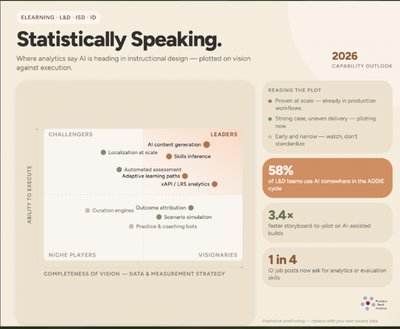
DATA ANALYSIS – What it confirms about the future of AI L&D ISD
Statistically speaking: the data is no longer describing where Learning & Development (L&D) has been — it’s forecasting where it’s going.
AI infiltration is settled. Roughly 70-90% of L&D teams now use AI in training and development, with only 2% having no adoption plans, yet just 36% have it running inside defined instructional design workflows and only 10% are beginning to scale it.
The market-sizing spread is a feature, not a data problem. Reported L&D market values range from $18B to $445B depending on the firm, because “corporate training,” “e-learning,” and “LMS” are defined differently by each. The analytically useful signal isn’t any single figure — it’s that platform/LMS segments are growing at 20%+ while broad corporate training grows at ~8%. Spend is migrating from delivery services into technology infrastructure at roughly 2.5x the overall market rate.
The instructional design profession is your best case study. Hiring managers overwhelmingly expect AI to change their learning teams within a year, but almost as overwhelmingly say it won’t shrink them — while job titles fragment toward “Learning Experience Designer” and salaries split into AI-fluent and non-AI-fluent tracks. That’s bifurcation within a role, not elimination of it, and it’s likely the pattern across most knowledge work. It changes what L&D should actually be buying.
The entry-level pipeline risk is underweighted almost everywhere. If AI absorbs entry-level task volume and hiring contracts there, the apprenticeship path that produces mid-level talent breaks quietly — and the damage surfaces five years after the decision that caused it. Most L&D strategy decks don’t have a slide for this. AI L&D ISD Quadrant Reports – The future trajectory of AI L&D ISD
AI vs. Traditional Development
The Power of AI
AI vs Traditional Development -Video
- 1 Skilled Developer Utilizing AI Can Out-Perform 10 Traditional Developers
- Complete in 90% Less Time
One multi-skilled ID developer can complete in one hour what previously took a ten-person team of specialized professionals 40 hours. A 90% reduction, both in manpower and development time. Consequently, a theoretical $100K budget is reductively decreased to $10K.
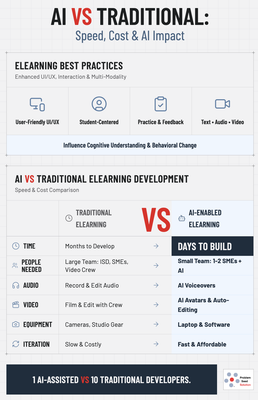
eLearning Best Practices: The Foundation For Real Impact
Properly developed eLearning transcends simple information delivery; it is a powerful tool capable of shaping cognitive frameworks and driving sustainable behavioral change. Achieving this requires a learner-centric approach built on core best practices.
AI Benefits In eLearning: A Revolution In Speed & Cost
The integration of Artificial Intelligence (AI) is fundamentally disrupting the traditional eLearning development lifecycle, offering dramatic advantages in speed, resource efficiency, and cost.
Comparison: Traditional vs. AI-Accelerated Process
| Phase | Traditional eLearning Process | New AI-Accelerated Process |
|---|---|---|
| ISD & Design | Weeks of work by Instructional Designers (IDs) to storyboard. | AI tools rapidly generate course outlines, scripts, and learning objectives based on prompts. IDs shift to curating and refining. |
| Create: Assets | Expert people resources: IDs, graphic artists, videographers, audio engineers, programmers. Equipment: high-end cameras, recording studios, editing suites. | AI resources leverage a smaller core team (ID, SME) using AI tools. Equipment: standard computers with AI software. |
| Audio | Record in studio, extensive manual editing for quality & mistakes. | Generate human-like voiceovers instantly from text; AI cleans up and edits recordings in minutes. |
| Video | Schedule & shoot with 3 people (talent, crew), lengthy professional editing. | Generate presenter-led videos with AI avatars or synthesize footage from existing media; edit with AI-powered tools. |
| Development | Manual coding or authoring tool assembly, requiring programming skill. | Use AI-assisted authoring tools that suggest interactions, auto-translate, and adapt content. |
| Total Time | Months for a robust course. | Weeks or even days for a comparable course. |
Monetary & Speed Advantages: the contrast is stark. The traditional model requires significant upfront investment in expert people resources and specialized equipment. AI dramatically reduces this barrier, automating labor-intensive tasks like audio editing and video production. What took a team weeks to design, create, and edit can now be prototyped in days. This efficiency slashes development costs by 30–50% or more and allows for rapid iteration, enabling organizations to deploy timely, responsive training. The shift isn’t about replacing human expertise but amplifying it — freeing IDs and SMEs to focus on strategic learning design, nuanced feedback, and ensuring the course truly influences the desired cognitive and behavioral outcomes.
Overkill?
In 40 years I have witnessed large corporations employ robust tools such as Articulate or Captivate to create a simple online “electronic page turner” — this is severe overkill. It further strengthens the notion that the more money thrown at an employee performance problem, the better. No wonder so many eTraining projects under-perform. eTraining development can be both effective and creative if the right tool is selected for the job.
Are training professionals applying the best e-Learning Instructional Design development methods?
PowerPoint: seventy to eighty percent (80%) of corporate industry at large use MS Word and PowerPoint as the eTraining development tool of choice. These tools first digitize existing content and then auto-create what’s referred to as simple electronic page turners. There is nothing wrong with this simple method, other than it should not require a full team of professionals and hours of meetings just to reproduce an electronic or PDF course from a printed version of existing course materials.
Most of their eLearning output is text and static graphics.
Most Used Development Tools?
What Corporations Actually Use For eLearning Development
Modern corporate eLearning is typically built with authoring tools designed for interactive, multimedia, standards-compliant learning that works in Learning Management Systems (LMS).
Common authoring tools in 2025 include:
- Articulate 360 (Storyline & Rise) — widely seen as a go-to tool for interactive corporate modules.
- Adobe Captivate — strong for simulations, responsive content, advanced interactions.
- iSpring Suite — sits on PowerPoint but outputs proper eLearning formats (SCORM/xAPI), bridging PPT familiarity with eLearning needs.
- Easygenerator, H5P, Gomo and others — cloud or browser-based tools with drag-and-drop and collaborative features.
These tools support interactive elements, assessments, branching logic, mobile delivery, and standards (like SCORM and xAPI), which a raw PowerPoint file doesn’t inherently provide.
Snapshot Table By % Used
| Authoring Tool | Approx. Market Share (2025) | Typical Use in Corporations | Notes |
|---|---|---|---|
| Adobe Captivate | ~19% to 27% | Large enterprise & interactive content | Powerful for responsive design, VR/AR, simulations. |
| Articulate (360, Storyline, Rise) | ~17% to 22% | Widely used authoring for courses, scenarios | Popular for interactive courses with triggers/variables. |
| iSpring Suite | Leading in deployments | PowerPoint-to-eLearning conversion | Often chosen where existing PPT content is reused. |
| 360Learning | Smaller share (enterprise segment) | Collaborative authoring + LMS | Growing, especially where learning + LMS are bundled. |
| Easygenerator | Lower share | Cloud-based, rapid authoring | Simple courses and SMEs. |
| Lectora / Elucidat / Others | — | — | — |
eLearning Parametric Thinking — BrainSpark Evolution
AI ELearning ISD, the evolution of training.

A thinking process that considers all related influences, and counter-actions, to generate solutions to problems.
- Root Cause Deficiencies & Disruptions to Learning


“e-Learning for brain metamorphosis — individual, community, nation and global transformation.” Parametric GUI
Ike Austin is the founder and a contributor. An eLearning & ISD patron for over 40 years, publishing regular education articles about eLearning & instructional design, providing insight into its historical & rapid transition. At the beginning of every problem is a signal for training.
Contact Info: eMail Ike Austin